Player homes with GUI access, limits, warmups and safe teleport behavior.
- Save multiple personal locations as homes and return to them with commands or the Homes GUI.
- Home limits can be controlled per player, while teleport warmup and cooldown settings keep movement balanced.
- Safe teleport checks help avoid placing players in unsuitable locations, and administrators can inspect or access other players’ homes when permitted.
For server ownersServer owners can define default home limits, teleport delays, cooldowns and movement/damage cancellation behavior.
Public server destinations with menus, administration and optional economy costs.
- Create public destinations that players can browse in a GUI or reach directly with /warp.
- Warps can be organized with categories and ordering so larger servers can keep travel destinations structured.
- Optional economy costs can charge players for using selected warps, while administrators can create, move, edit and remove destinations.
For server ownersSupports protected/admin-managed warps, GUI administration, teleport warmup and optional economy costs.
TPA requests, administrative teleports, back locations and teleport controls.
- Provides player-to-player teleport requests with /tpa and /tpahere, including accept, deny and cancel flows.
- Includes administrative teleport tools such as direct teleport, teleport-here and teleport-all actions.
- The /back system can return players to previous or death locations, while warmups, cooldowns and movement/damage cancellation can be configured.
For server ownersUseful for both survival-friendly request teleports and staff-controlled direct teleports.
Global and per-world spawn behavior for joins, respawns and commands.
- Defines a central server spawn and optional world-specific spawn behavior.
- Players can use /spawn, while staff can set, change or remove the configured spawn location.
- First-join and respawn behavior can be configured so new or respawning players arrive at the intended location.
For server ownersSupports global and per-world spawn concepts plus configurable teleport delay.
Safe random teleportation with world controls, cooldowns and optional costs.
- Randomly teleports players within configurable distance limits for exploration and survival gameplay.
- Can respect the world border, avoid water and restrict which worlds may be used.
- Cooldowns and optional economy costs help control repeated use, while compatible land-protection integrations can be respected.
For server ownersWorld whitelist/blacklist, radius, attempt count and cost settings are configurable.
Commands for common world time and weather changes.
- Lets authorized users change world time to common presets such as day, night, noon or midnight.
- Provides weather control for normal server administration without requiring separate utility plugins.
- World targeting allows staff to manage the environment of specific worlds when needed.
For server ownersDesigned as a straightforward world-administration utility.
Wallet balances, payments, leaderboards, history and administrative economy controls.
- Provides player wallet balances, payments between players and a balance leaderboard.
- Players can review transaction history, while staff can inspect and modify economy balances through administrative tools.
- Starting balance, maximum balance, currency names, formatting, transfer limits and optional taxes are configurable.
For server ownersCan act as the economy foundation for other NexCore systems and Vault-compatible integrations.
Personal bank accounts with deposits, withdrawals, transfers, history and administration.
- Adds personal bank accounts separate from the normal wallet balance.
- Players can deposit, withdraw and transfer bank funds, and review their bank transaction history.
- Server owners can configure maximum bank balances, transfer fees and optional recurring interest; staff can administer player accounts.
For server ownersThe banking GUI gives players a dedicated interface for common account actions.
Player kits with menu access, permissions and cooldown-oriented behavior.
- Lets players claim configured item kits through commands or a menu.
- Kits can use cooldowns to limit how often they may be claimed.
- Permission requirements can be used to create rank-specific, donor-specific or progression-based kits, while staff can manage and give kits.
For server ownersUseful for starter kits, rank rewards, event kits and recurring survival supplies.
Rank-related server features and integration-ready player presentation.
- Provides NexCore rank-related features for consistent player presentation and server structure.
- Ranks can be used alongside compatible permission systems so player identity remains consistent across NexCore displays and messages.
- The module is intended to complement public rank and presentation settings rather than replace server permission management.
For server ownersBest used together with the server’s chosen permission/rank setup.
Private messages, replies, ignore, social spy, chat control, slow chat and staff chat.
- Adds private messages, quick replies, ignore/unignore lists and staff social spy.
- Server chat can be cleared, slowed or managed by staff, and a dedicated staff chat keeps team communication separate.
- Mentions can notify players, color/format support can be configured and optional chat channels can be enabled.
For server ownersCentralizes common chat-management features in one module.
Player nicknames with configurable naming rules and presentation support.
- Allows players or staff to assign display nicknames without changing the real Minecraft account name.
- Nickname length, blocked names, colors and formatting can be controlled by the server.
- Nicknames can also be reflected in supported tablist and nametag presentation features.
For server ownersUseful for roleplay, communities and staff-controlled display identities.
Warnings, punishments, freezes, jail, history and staff notes.
- Provides warnings, punishments, freezing, jail management, moderation history and staff notes.
- Freeze can restrict player interaction while staff investigate a situation, and jail can keep punished players within the configured jail area.
- Staff can review past moderation actions and attach notes to player records for better team context.
For server ownersDesigned for structured moderation rather than isolated one-off punishment commands.
Staff mode, vanish, inventory inspection, command spy and staff utilities.
- Adds a dedicated staff mode with purpose-built moderation items and quick actions.
- Staff can use vanish, inspect player inventories, freeze players and jump to random online players for checks.
- Command spy and additional staff utilities help moderators observe server activity, while staff mode restores the normal inventory when exited.
For server ownersThe staff inventory and allowed actions are configurable for the server team.
Administrative player-management functions used across NexCore systems.
- Groups common administrator-facing player management actions used throughout NexCore.
- It provides a central foundation for tasks such as player inspection, direct actions and management workflows from other admin interfaces.
- This module is mainly relevant to staff and server operators rather than normal players.
For server ownersEspecially useful together with the Admin Panel and moderation features.
Convenience commands such as heal, feed, fly, god, speed and virtual workstations.
- Provides everyday convenience commands such as heal, feed, fly, god mode and movement speed control.
- Virtual utility interfaces such as workbench or ender chest access can reduce the need for multiple small utility plugins.
- Permissions let server owners decide which tools are available to players, ranks or staff.
For server ownersA collection of optional quality-of-life commands rather than one gameplay system.
Manual and automatic AFK states, prefixes and optional AFK handling.
- Lets players mark themselves AFK and can automatically detect inactivity after a configured period.
- AFK state can be shown with a prefix and optionally broadcast when players become active or inactive.
- Servers can disable rewards while a player is AFK and optionally auto-kick players after extended inactivity.
For server ownersUseful for fair reward systems and clearer player availability.
18Broadcasts
Communication Announcements, titles, actionbars, bossbar messages and automatic broadcasts.
- Handles server-wide announcements in multiple presentation styles.
- Messages can be sent as normal chat broadcasts, titles, actionbars or bossbars depending on the configured use case.
- Automatic broadcasts and join-related announcements can keep players informed without manual staff action.
For server ownersUseful for news, reminders, event notices and server information.
19Maintenance
Administration Server maintenance mode and player access management.
- Places the server into a controlled maintenance state when normal player access should be restricted.
- Authorized staff can keep access while regular players are blocked according to the configured maintenance rules.
- Maintenance status can be managed through NexCore administration instead of relying only on the server whitelist.
For server ownersUseful for updates, maintenance windows, testing and controlled reopening.
20Whitelist
Administration NexCore whitelist controls and a dedicated whitelist GUI.
- Provides NexCore-managed whitelist controls together with a dedicated management GUI.
- Staff can review and manage allowed players from a more convenient interface than raw server commands alone.
- It can be used for private servers, staged openings, testing phases or temporary access control.
For server ownersComplements maintenance mode with normal long-term access management.
Player-facing server rules with acceptance and administrative editing options.
- Shows server rules to players in a consistent NexCore interface.
- Servers can require players to acknowledge or accept rules and track that public acceptance state.
- Administrators can update the public rule content without exposing any internal plugin details.
For server ownersUseful for onboarding, community standards and rule-change acknowledgement.
Player reports with staff review, claiming and GUI workflows.
- Lets players report other players with a reason so staff receive a structured case instead of an untracked chat message.
- Staff can review open reports in a GUI, claim a case for handling and update its status as it is processed.
- The system gives moderation teams a shared workflow and clearer overview of unresolved reports.
For server ownersWorks well together with moderation history and the Admin Panel.
Support tickets for players and staff with replies, claiming and closing.
- Provides a support-ticket system for questions or problems that need staff assistance.
- Players can create tickets and continue the conversation through replies instead of relying on one-time reports.
- Staff can claim tickets, respond, track status and close completed requests.
For server ownersBest suited for support cases; Reports remain focused on player misconduct.
Profiles, playtime, last-seen information, privacy, personal settings and player status.
- Provides player profile information such as playtime, last-seen data and personal status.
- Privacy controls can determine whether selected profile values such as balance, playtime or home counts are visible.
- Personal settings can be exposed through the profile experience, giving players more control over how NexCore presents their information.
For server ownersUseful as a central player-information surface for communities and staff.
25Analytics
Administration Player and server statistics exposed through administrator-facing analytics.
- Collects administrator-facing player and server statistics for a clearer operational overview.
- Analytics can summarize activity and expose useful values for dashboards and staff review.
- The module is intended for server insight and trend awareness, not for exposing private internal system details.
For server ownersUseful for understanding activity, usage and server health at a high level.
Scoreboards, tablists and nametags for player-facing server presentation.
- Controls player-facing scoreboards, tablists and nametags as one coordinated display suite.
- Layouts can show NexCore values and compatible placeholders for player, economy, server and world information.
- Players can have personal display states while server owners control the overall layouts, refresh behavior and presentation.
For server ownersDesigned to give the server a consistent visual identity across multiple display surfaces.
Configurable hologram displays managed through NexCore commands.
- Creates configurable in-world hologram displays for information, navigation or presentation.
- Administrators can manage holograms through NexCore commands and adjust public display content.
- Holograms can be used for spawn information, rules, rankings, tutorials or other server-facing messages.
For server ownersA presentation tool for persistent world-space information.
28Presentation
Presentation HUD and title presentation features for contextual player information.
- Provides contextual HUD, title and presentation features beyond the normal scoreboard/tablist display.
- Server owners can show information only when certain public conditions match, allowing different experiences for different contexts.
- It is useful for temporary status displays, zone information, staff views or event-oriented presentation.
For server ownersComplements the Display module with more contextual presentation flows.
Configurable server-list MOTD presentation and preview tools.
- Controls the public message shown for the server in the multiplayer server list.
- Server owners can configure the visible MOTD and preview how it will look before presenting it to players.
- It helps keep maintenance, branding or general server information consistent at the first point of contact.
For server ownersFocused on public server-list presentation, not internal server messaging.
Daily player rewards with claim-oriented progression.
- Rewards players for returning on different days and claiming their daily reward.
- A streak can represent continued daily participation and be shown through public reward information.
- Server owners can use it for retention-focused rewards without requiring players to stay online for a specific playtime milestone.
For server ownersComplements playtime rewards with a calendar/day-based reward loop.
32Playtime Rewards
Rewards Rewards based on player playtime milestones.
- Rewards players when they reach configured playtime milestones.
- Progress can be tracked over time and players can claim rewards tied to their accumulated playtime.
- This creates long-term progression incentives for active community members.
For server ownersUseful for loyalty rewards, progression tracks and long-term engagement.
33Custom Commands
Administration Publicly configurable custom server commands.
- Lets server owners define additional public server commands through configuration.
- Custom commands can provide shortcuts, information or guided actions without needing a separate plugin for every simple command.
- This is intended for administrator-configured public behavior, not arbitrary code execution.
For server ownersBest suited for simple server shortcuts and informational commands.
Shared cooldown behavior used by configurable NexCore features.
- Provides shared cooldown handling for NexCore features that should not be spammed or reused immediately.
- Cooldown state can be displayed or administered where supported, helping players understand when an action becomes available again.
- By centralizing cooldown behavior, different modules can present more consistent timing rules.
For server ownersSupports server balance and clearer reuse timing across multiple features.
35Placeholder Api
Integration Optional PlaceholderAPI expansion exposing NexCore values to compatible plugins.
- Exposes public NexCore values to PlaceholderAPI-compatible plugins when PlaceholderAPI is installed.
- This allows server owners to use NexCore player, economy, world, moderation, reward and server values in compatible scoreboards, menus or other displays.
- NexCore remains usable without PlaceholderAPI; the integration simply expands where NexCore values can be displayed.
For server ownersUseful for connecting NexCore information with the wider plugin ecosystem.
Network server selection features for multi-server environments.
- Provides a server-selection experience for multi-server networks using a compatible NexCore bridge setup.
- Players can see configured backend servers and use a GUI to move between network destinations.
- Server status, player counts, maintenance state and permission requirements can be presented in the selector where configured.
For server ownersRelevant only for servers that use NexCore in a supported network/proxy environment.
World listing, creation, import, load, unload, teleport, rules and spawn tools.
- Provides staff tools for listing, creating, importing, loading and unloading worlds.
- Administrators can teleport to worlds, manage common world rules and work with world spawn settings from NexCore.
- The dedicated World Management interface makes multi-world administration easier to understand than relying only on raw commands.
For server ownersUseful for survival networks, event worlds, build worlds, lobbies and temporary worlds.
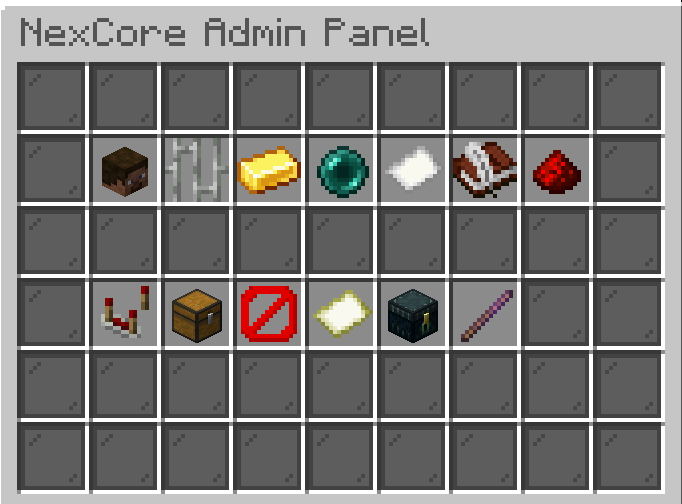
38Admin Panel
Administration Ingame administration panel for central staff workflows.
- Provides an ingame control center for common NexCore administration tasks.
- Sections can bring together player management, moderation, economy, homes/warps, reports, tickets, modules, server status, maintenance, analytics, backups and debugging tools.
- Player-focused actions can include teleportation, healing, feeding, inventory inspection, economy/bank administration, warnings, punishments and staff notes, depending on permissions.
For server ownersDangerous or sensitive actions can be permission-protected and presented through confirmation workflows.
Network-facing NexCore features used with compatible proxy/bridge setups.
- Groups NexCore features intended for multi-server environments using compatible proxy and bridge setups.
- It can support network-aware player information, server switching context and shared server-facing features where the surrounding network is configured for it.
- Single-server installations do not need this module to use NexCore’s normal core features.
For server ownersIntended for networks that want NexCore features to span more than one backend server.